Typora 自带主题升级会覆盖,直接改 github.css 不稳妥。做法是复制一份自定义主题 github-cus,在上面改行内代码颜色,以及正文 / 大纲的标题自动编号。
本文环境:Linux,主题目录 ~/.config/Typora/themes/(Windows 一般在 %APPDATA%\Typora\themes\,macOS 在 ~/Library/Application Support/abnerworks.Typora/themes/)。
为什么要复制一份主题
主题目录里的 Readme.md 写得很清楚:内置 CSS 更新或重装后会被替换,不要直接改内置主题。
正确姿势见官方文档:
目标文件结构:
text
1~/.config/Typora/themes/
2├── github.css              ← 内置,不动
3├── github/                 ← 内置字体,不动
4├── github-cus.css          ← 自定义主题入口
5└── github-cus/             ← 字体资源(从 github/ 复制)
~/.config/Typora/themes/
├── github.css              ← 内置,不动
├── github/                 ← 内置字体,不动
├── github-cus.css          ← 自定义主题入口
└── github-cus/             ← 字体资源(从 github/ 复制)
Typora 主题名取自 CSS 文件名:github-cus.css → 主题选择器里一般显示为 Github Cus。
从 github 复制出 github-cus
bash
1THEMES="$HOME/.config/Typora/themes"
2
3cp "$THEMES/github.css" "$THEMES/github-cus.css"
4cp -a "$THEMES/github" "$THEMES/github-cus"
5
6# 字体路径从 ./github/ 改到 ./github-cus/
7sed -i "s|url('./github/|url('./github-cus/|g" "$THEMES/github-cus.css"
THEMES="$HOME/.config/Typora/themes"

cp "$THEMES/github.css" "$THEMES/github-cus.css"
cp -a "$THEMES/github" "$THEMES/github-cus"

# 字体路径从 ./github/ 改到 ./github-cus/
sed -i "s|url('./github/|url('./github-cus/|g" "$THEMES/github-cus.css"
复制后 @font-face 应类似:
css
1src: local('Open Sans Regular'), local('OpenSans-Regular'),
2     url('./github-cus/open-sans-v17-latin-ext_latin-regular.woff2') format('woff2');
src: local('Open Sans Regular'), local('OpenSans-Regular'),
     url('./github-cus/open-sans-v17-latin-ext_latin-regular.woff2') format('woff2');
然后在 Typora:主题 → Github Cus。后面所有改动都只动 github-cus.css。
行内代码改成掘金风格
目标效果
正文里的 `Integer` 一类行内代码:
- 字色:
#ff502c(橙红)
- 背景:
rgba(255, 80, 44, 0.1)(淡橙红底)
- 无边框、小圆角、左右略留白
围栏代码块(```)继续用原来的灰底,不要跟行内代码混成同一种颜色。
原主题怎么写的
github 主题里行内代码和围栏代码块绑在一起:
css
 1.md-fences,
 2code,
 3tt {
 4    border: 1px solid #e7eaed;
 5    background-color: #f8f8f8;
 6    border-radius: 3px;
 7    padding: 2px 4px 0px 4px;
 8    font-size: 0.9em;
 9}
10
11code {
12    background-color: #f3f4f4;
13    padding: 0 2px 0 2px;
14}
.md-fences,
code,
tt {
    border: 1px solid #e7eaed;
    background-color: #f8f8f8;
    border-radius: 3px;
    padding: 2px 4px 0px 4px;
    font-size: 0.9em;
}

code {
    background-color: #f3f4f4;
    padding: 0 2px 0 2px;
}
问题在于:改 code 会连带影响 .md-fences 里的 code,所以必须拆开,并给围栏内部做还原。
替换成下面这段
在 github-cus.css 里,把上面那段改成:
css
 1/* Inline code — Juejin style */
 2code,
 3tt {
 4    margin: 0 2px;
 5    padding: 2px 4px;
 6    border: none;
 7    border-radius: 2px;
 8    background-color: rgba(255, 80, 44, 0.1);
 9    color: #ff502c;
10    font-size: 0.9em;
11    font-family: Consolas, Monaco, "Courier New", monospace;
12}
13
14.md-fences {
15    margin-bottom: 15px;
16    margin-top: 15px;
17    padding: 8px 4px 6px;
18    border: 1px solid #e7eaed;
19    border-radius: 3px;
20    background-color: #f8f8f8;
21    font-size: 0.9em;
22    color: inherit;
23}
24
25.md-fences code,
26.md-fences tt {
27    margin: 0;
28    padding: 0;
29    border: none;
30    border-radius: 0;
31    background-color: transparent;
32    color: inherit;
33    font-size: inherit;
34}
/* Inline code — Juejin style */
code,
tt {
    margin: 0 2px;
    padding: 2px 4px;
    border: none;
    border-radius: 2px;
    background-color: rgba(255, 80, 44, 0.1);
    color: #ff502c;
    font-size: 0.9em;
    font-family: Consolas, Monaco, "Courier New", monospace;
}

.md-fences {
    margin-bottom: 15px;
    margin-top: 15px;
    padding: 8px 4px 6px;
    border: 1px solid #e7eaed;
    border-radius: 3px;
    background-color: #f8f8f8;
    font-size: 0.9em;
    color: inherit;
}

.md-fences code,
.md-fences tt {
    margin: 0;
    padding: 0;
    border: none;
    border-radius: 0;
    background-color: transparent;
    color: inherit;
    font-size: inherit;
}
要点:
- 只给裸
code / tt 上掘金色
.md-fences 单独保留灰底围栏样式.md-fences code 清掉颜色和背景,避免代码块里每个 token 都变橙红
改完后重选一次主题,或重启 Typora。
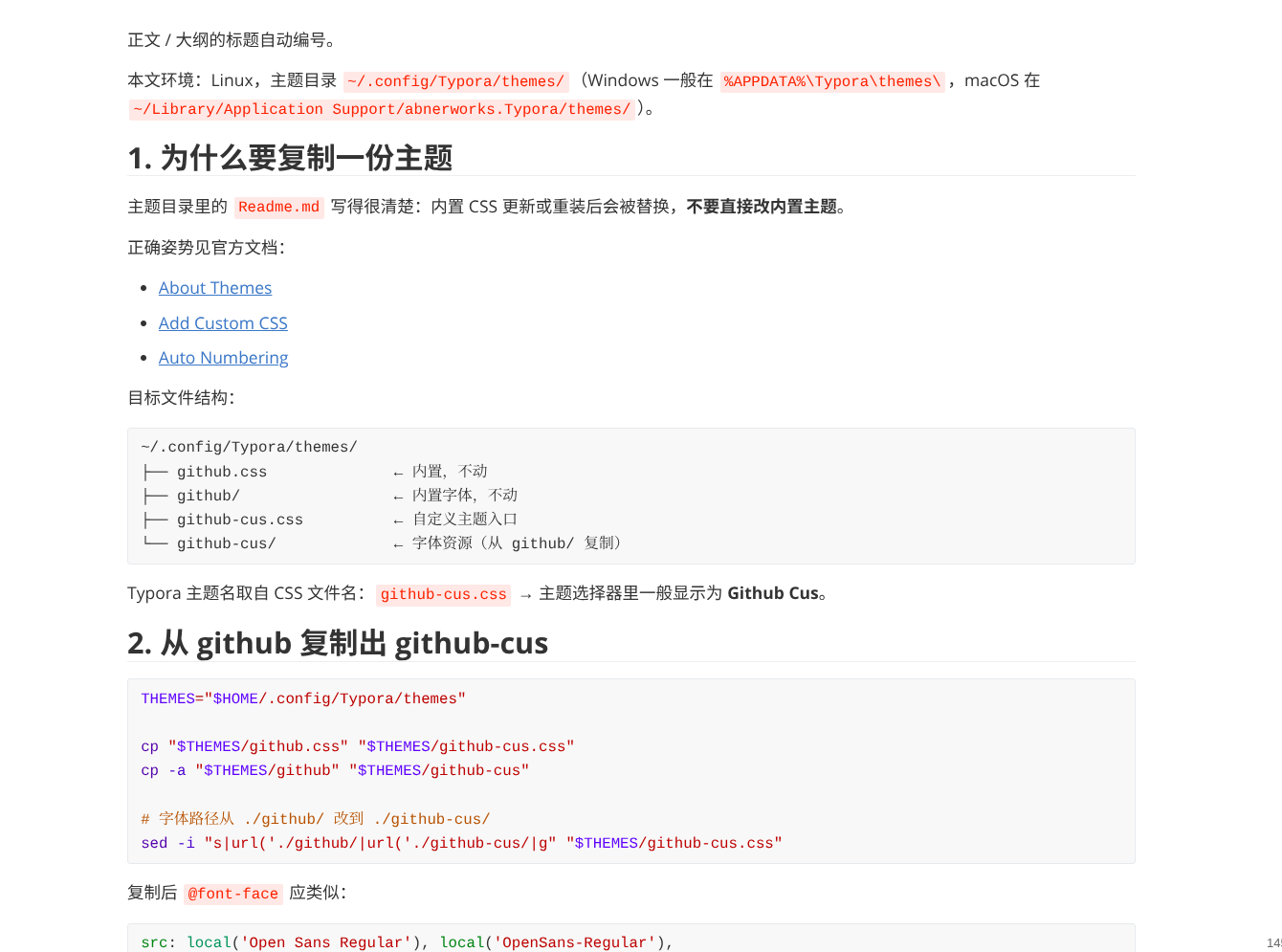
正文标题自动编号(从 h2 起)
需求
文章一般是「一级标题当文题,正文从二级开始分节」:
| Markdown |
显示 |
# 文题 |
不编号 |
## 第一节 |
1. 第一节 |
### 小节 |
1.1. 小节 |
## 第二节 |
2. 第二节 |
编号只出现在显示层,不会写进 Markdown 源文件。
原理
用 CSS counters:上级标题 counter-reset 下级,:before 里 counter-increment 并拼出 1. / 1.1.。官方方案从 h1 起算,这里改成从 h2 起。
追加到 github-cus.css 末尾
css
 1/* Auto-number headings from h2 (h1 is document title) */
 2#write {
 3    counter-reset: h2;
 4}
 5
 6h2 {
 7    counter-reset: h3;
 8}
 9
10h3 {
11    counter-reset: h4;
12}
13
14h4 {
15    counter-reset: h5;
16}
17
18h5 {
19    counter-reset: h6;
20}
21
22#write h2:before {
23    counter-increment: h2;
24    content: counter(h2) ". ";
25}
26
27#write h3:before,
28h3.md-focus.md-heading:before {
29    counter-increment: h3;
30    content: counter(h2) "." counter(h3) ". ";
31}
32
33#write h4:before,
34h4.md-focus.md-heading:before {
35    counter-increment: h4;
36    content: counter(h2) "." counter(h3) "." counter(h4) ". ";
37}
38
39#write h5:before,
40h5.md-focus.md-heading:before {
41    counter-increment: h5;
42    content: counter(h2) "." counter(h3) "." counter(h4) "." counter(h5) ". ";
43}
44
45#write h6:before,
46h6.md-focus.md-heading:before {
47    counter-increment: h6;
48    content: counter(h2) "." counter(h3) "." counter(h4) "." counter(h5) "." counter(h6) ". ";
49}
50
51/* 覆盖聚焦态默认左边浮动样式,避免编辑时编号错位 */
52#write > h3.md-focus:before,
53#write > h4.md-focus:before,
54#write > h5.md-focus:before,
55#write > h6.md-focus:before,
56h3.md-focus:before,
57h4.md-focus:before,
58h5.md-focus:before,
59h6.md-focus:before {
60    color: inherit;
61    border: inherit;
62    border-radius: inherit;
63    position: inherit;
64    left: initial;
65    float: none;
66    top: initial;
67    font-size: inherit;
68    padding-left: inherit;
69    padding-right: inherit;
70    vertical-align: inherit;
71    font-weight: inherit;
72    line-height: inherit;
73}
/* Auto-number headings from h2 (h1 is document title) */
#write {
    counter-reset: h2;
}

h2 {
    counter-reset: h3;
}

h3 {
    counter-reset: h4;
}

h4 {
    counter-reset: h5;
}

h5 {
    counter-reset: h6;
}

#write h2:before {
    counter-increment: h2;
    content: counter(h2) ". ";
}

#write h3:before,
h3.md-focus.md-heading:before {
    counter-increment: h3;
    content: counter(h2) "." counter(h3) ". ";
}

#write h4:before,
h4.md-focus.md-heading:before {
    counter-increment: h4;
    content: counter(h2) "." counter(h3) "." counter(h4) ". ";
}

#write h5:before,
h5.md-focus.md-heading:before {
    counter-increment: h5;
    content: counter(h2) "." counter(h3) "." counter(h4) "." counter(h5) ". ";
}

#write h6:before,
h6.md-focus.md-heading:before {
    counter-increment: h6;
    content: counter(h2) "." counter(h3) "." counter(h4) "." counter(h5) "." counter(h6) ". ";
}

/* 覆盖聚焦态默认左边浮动样式,避免编辑时编号错位 */
#write > h3.md-focus:before,
#write > h4.md-focus:before,
#write > h5.md-focus:before,
#write > h6.md-focus:before,
h3.md-focus:before,
h4.md-focus:before,
h5.md-focus:before,
h6.md-focus:before {
    color: inherit;
    border: inherit;
    border-radius: inherit;
    position: inherit;
    left: initial;
    float: none;
    top: initial;
    font-size: inherit;
    padding-left: inherit;
    padding-right: inherit;
    vertical-align: inherit;
    font-weight: inherit;
    line-height: inherit;
}
说明:
#write 是正文编辑区根节点,计数器挂在这里- 不要给
#write h1:before 写编号
h3.md-focus.md-heading:before 等是为了压过 Typora 聚焦标题时的默认伪元素样式
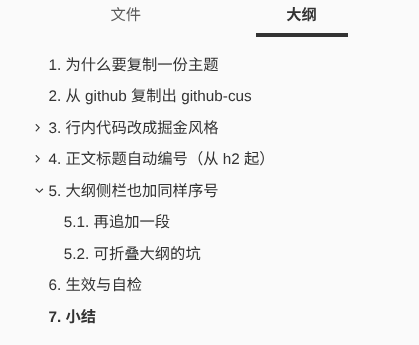
大纲侧栏也加同样序号
正文有编号、左侧「大纲」没有,对不上。侧栏用另一套选择器:.outline-h2、.outline-label 等。
再追加一段
css
 1/* Auto-number outline panel from h2(与正文一致) */
 2.sidebar-content {
 3    counter-reset: h2;
 4}
 5
 6.outline-h2 {
 7    counter-reset: h3;
 8}
 9
10.outline-h3 {
11    counter-reset: h4;
12}
13
14.outline-h4 {
15    counter-reset: h5;
16}
17
18.outline-h5 {
19    counter-reset: h6;
20}
21
22.outline-h2 > .outline-item > .outline-label:before {
23    counter-increment: h2;
24    content: counter(h2) ". ";
25}
26
27.outline-h3 > .outline-item > .outline-label:before {
28    counter-increment: h3;
29    content: counter(h2) "." counter(h3) ". ";
30}
31
32.outline-h4 > .outline-item > .outline-label:before {
33    counter-increment: h4;
34    content: counter(h2) "." counter(h3) "." counter(h4) ". ";
35}
36
37.outline-h5 > .outline-item > .outline-label:before {
38    counter-increment: h5;
39    content: counter(h2) "." counter(h3) "." counter(h4) "." counter(h5) ". ";
40}
41
42.outline-h6 > .outline-item > .outline-label:before {
43    counter-increment: h6;
44    content: counter(h2) "." counter(h3) "." counter(h4) "." counter(h5) "." counter(h6) ". ";
45}
/* Auto-number outline panel from h2(与正文一致) */
.sidebar-content {
    counter-reset: h2;
}

.outline-h2 {
    counter-reset: h3;
}

.outline-h3 {
    counter-reset: h4;
}

.outline-h4 {
    counter-reset: h5;
}

.outline-h5 {
    counter-reset: h6;
}

.outline-h2 > .outline-item > .outline-label:before {
    counter-increment: h2;
    content: counter(h2) ". ";
}

.outline-h3 > .outline-item > .outline-label:before {
    counter-increment: h3;
    content: counter(h2) "." counter(h3) ". ";
}

.outline-h4 > .outline-item > .outline-label:before {
    counter-increment: h4;
    content: counter(h2) "." counter(h3) "." counter(h4) ". ";
}

.outline-h5 > .outline-item > .outline-label:before {
    counter-increment: h5;
    content: counter(h2) "." counter(h3) "." counter(h4) "." counter(h5) ". ";
}

.outline-h6 > .outline-item > .outline-label:before {
    counter-increment: h6;
    content: counter(h2) "." counter(h3) "." counter(h4) "." counter(h5) "." counter(h6) ". ";
}
可折叠大纲的坑
官方说明:大纲自动编号建议先关掉「可折叠大纲」,改用扁平大纲,否则折叠后 DOM/计数可能对不齐。
路径大致是:偏好设置 → 大纲 / Outline → 关闭可折叠大纲(Collapsible Outline)。
大纲面板空白处右键,有时也能切换扁平 / 折叠视图。
生效与自检
- 主题选中 Github Cus
- 改完 CSS 后重选主题或重启 Typora
- 打开一篇有
## / ### 的文档:
- 正文标题前应出现
1. / 1.1.
- 左侧大纲对应项也应有同样序号
- 行内
`code` 为橙红字 + 淡橙底
- ``` 代码块仍是灰底,块内文字不是橙红
效果如下:
小结
| 步骤 |
做什么 |
| 复制主题 |
github.css + github/ → github-cus.css + github-cus/,改字体路径 |
| 行内代码 |
拆开 code 与 .md-fences,行内用 #ff502c |
| 正文编号 |
#write 上从 h2 起的 CSS counter + 聚焦态覆盖 |
| 大纲编号 |
.sidebar-content / .outline-hN 同样从 h2 起;必要时关可折叠大纲 |
完整主题文件就在本机:
text
1~/.config/Typora/themes/github-cus.css
2~/.config/Typora/themes/github-cus/
~/.config/Typora/themes/github-cus.css
~/.config/Typora/themes/github-cus/
以后要再调颜色或编号格式,只改这一份即可,不会被 Typora 升级冲掉内置 github。
